
How it works · Updated 7 September 2026 · 8 min read
How LastMinutesAI works.
LastMinutesAI is an iOS app for live football, listed on the App Store as LastMinutes: In-Play Value. From the 70th minute it reads changing match conditions, turns them into probabilities and fair prices, and keeps the record of any bets you log yourself. The model has learned from more than 25,000 historical matches. This guide explains every part of it.
What problem does LastMinutesAI solve?
A score app tells you about the goal after it lands. From the 70th minute, LastMinutesAI reads live match conditions and alerts you when late drama looks significantly more likely than normal for the minute. Temperature gives you that signal at a glance.
Picture a Saturday with ten matches running at once. You can watch one of them at best, and your phone is the only way to track the rest. What it gives you is the score. A 3–1 at the 74th minute might be a completely dead game, or it might be an all-timer comeback. On the scoreboard the two look identical; to LastMinutesAI, one is heating up while the other is freezing over.
The difference matters most in the last twenty minutes, when chasing teams push everyone forward and quiet games tip into chaos. By the time the goal notification arrives, the part worth watching has already happened. The app's job is to tell you which match is worth tuning in to, and to put a number on what is happening in it.
What does the app show?
Every covered match has four layers. The temperature shows whether late drama may be building. The numbers give each market's probability by full time against what is normal for the minute. The fair price turns that probability into a price with no margin in it. And the tracker keeps the record of whatever you did next.
1. The match temperature
Every live match carries a "match temperature". It answers the only question that matters at a glance: is this game heating toward late drama, or fading out? Most matches run neutral or cold. The ones worth your attention ignite, and when one does, the app can send you an alert.

2. The numbers
The app covers more than 40 markets per match across goals, corners and cards: totals and team lines, over and under, next goal, corner races, both teams to score, match result, double chance, and Asian lines on goals and total corners. For each one it shows the probability by full time against what is normal for the minute. Every market carries its own temperature, so you can see where the strongest signals sit.

3. The fair price
Every probability is also shown as a fair price: 100 divided by the model's chance, with no bookmaker margin added. It is the same number in a different unit, and it is the unit most people already think in. More on fair prices below.
4. Your own record
If you bet elsewhere, the app will keep the ledger. Log a bet in two taps and the tracker shows your profit and loss, hit rate and average odds, plus a Composure score built from how you bet rather than how it went. More on the tracker below.
What does the match temperature mean?
Temperature is an at-a-glance summary of the model's current view of a match. Labels run from Freezing to Scorching. They show where probability signals are strongest without predicting the final score or winner.
 Scorchingstrongest late-drama signal
 Hotelevated late-drama signal
 Coldlimited late-drama signal
 Freezinglowest late-drama signal
What is a fair price?
A fair price is 100 divided by the model's chance, with no margin added. If the model puts an outcome at 50 percent, the fair price is 2.00, and both sides of that market total exactly 100 percent. The app shows its own fair price and nothing else: no odds feed, no bookmaker links, no price comparison.
A probability and a price are the same fact in two units. Most people who follow football already read prices faster than percentages, so the app shows both.
The difference between a fair price and the one a bookmaker offers is the bookmaker's margin. When a goal is a genuine 50/50, the fair price is 2.00, yet over and under are commonly both offered at around 1.83. Those two prices imply more than 100 percent between them, and the gap is the bookmaker's cut.
What does the model look for?
The model reads live match statistics and changing game conditions. We process thousands of live observations throughout each match, then turn the live picture into probability signals.
The app groups those changing match conditions into four broad areas:
These conditions change as a match develops. The model identifies when the probability of an outcome has moved above or below what is normal for the minute.
On our core markets, goals and corners, the model is calibrated to within about 1.5 percentage points: when it says 60 percent, it happens roughly 60 percent of the time. Calibration is a statement about the long run across many matches, not about any single one.
What does "normal for the minute" mean?
"Normal for the minute" gives every probability context. Learning from more than 25,000 historical matches helps the model judge what is typical at each minute of a game.
Raw totals can mislead without context. A high count across a whole match may be unremarkable, while a burst of late activity can signal that conditions have changed.
The app turns that context into probability estimates, fair prices and temperature labels. When a market's probability rises significantly above what is normal for the minute, its temperature rises.
What does the bet tracker do?
The tracker is a personal journal for bets you have placed somewhere else. It connects to no bookmaker, it never asks for money, and stakes are recorded in units rather than currency. Everything it shows is a summary of what you typed in.
Log a bet in two taps and the tracker keeps it. Over time it gives you your real numbers: staked, profit and loss, return on investment, hit rate and average odds, broken down by market. It will also show your average edge, measured against the model's fair price on the bets you actually took, weighted by stake.
Two details are worth stating plainly, because they are unusual:
The Composure score
Alongside the ledger sits a Composure score: a discipline rating out of 100, built from four things. Your stake sizing, your restraint after a loss, your exposure across a single match, and the value in the prices you took.
Volume never raises it. Three disciplined bets in a week score identically to thirty of the same behaviour, by construction. Your profit and loss never touches the number: winning badly does not improve it, and losing well does not damage it. It appears once you have five settled bets, and it is designed to help you bet smarter, not more.
What is free, and what is Premium?
Live scores, hot-match alerts, the first rung of every market and the whole bet tracker are free, with no trial required. Premium unlocks every market at full depth, live, with a fair price on each.
Premium is an auto-renewing subscription bought through the App Store, monthly, quarterly or annually, with a 7-day free trial. Payment is charged to your Apple ID at confirmation of purchase, it renews unless you cancel at least 24 hours before the period ends, and you can manage or cancel it any time in your Apple ID settings. Full detail is in the Terms of Use.
If you have not gone Premium, the app also gives you 24 hours of full Premium free while it walks you through reading a price and logging a bet, and each value bet you log during that window adds two more hours, up to 36.
What does a real call look like?
At 74 minutes of Netherlands v Japan at the 2026 World Cup, the app graded Japan Hot for more corners by full time. Corners came in the 76th, 88th and 89th minutes, with the equaliser in between for 2–2. The alert was timestamped when it was sent, and the result was recorded at full time.
2–1 with sixteen minutes left, the notification arrived: the match was heating up.
Inside the app the call was narrow. Japan, hot for more corners by full time. The corners were the one part of the match running clearly above normal for the minute.
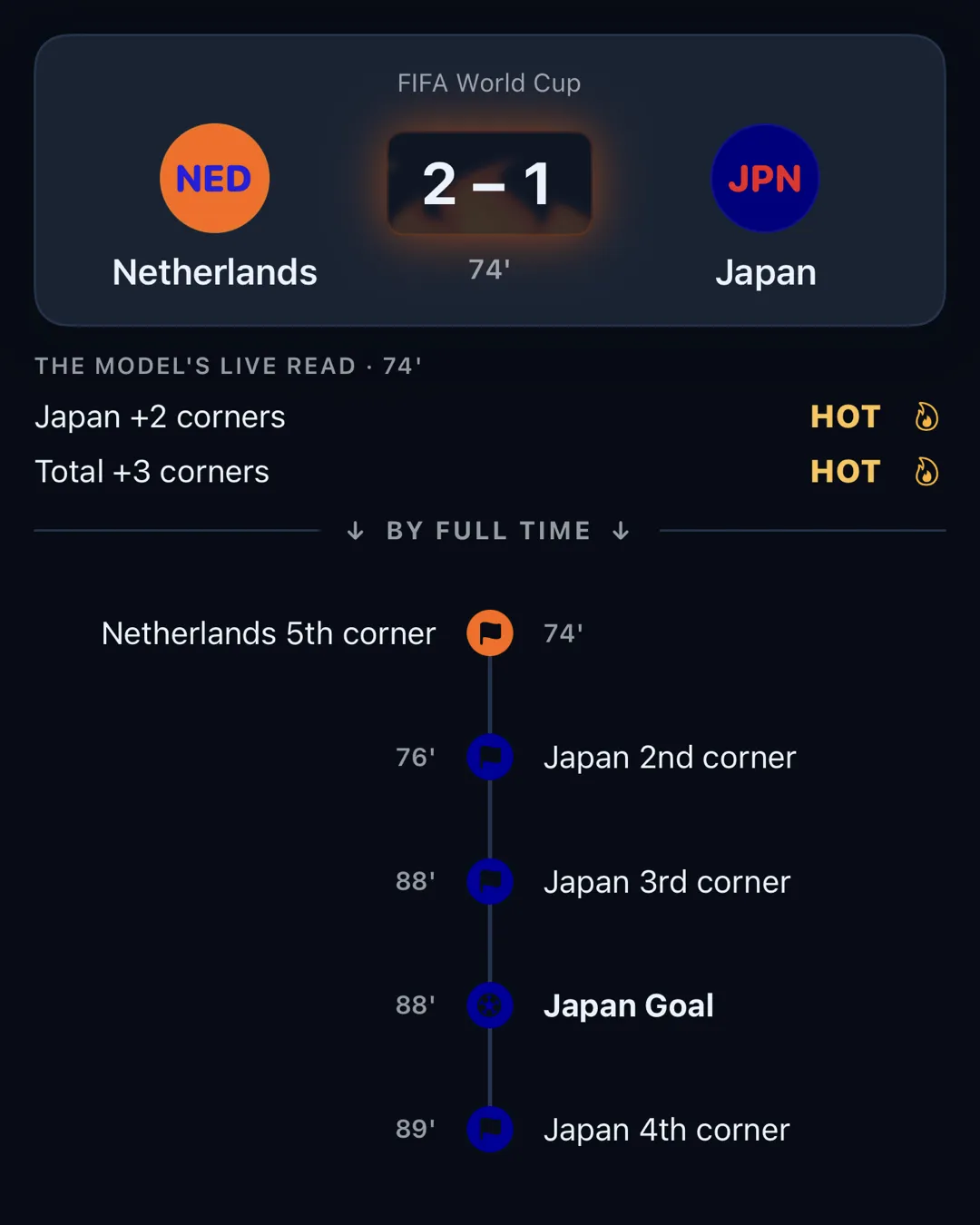
What followed: a Japan corner in the 76th minute, another in the 88th, another in the 89th, and in between them the equaliser, 2–2 in the 88th.
Football remains unpredictable. A Hot label means the probability is higher than normal for the minute, but it does not predict the result. Every recorded alert stays on the public record. You can track how the app performed in the 2026 World Cup in our World Cup diary.
LastMinutesAI is a football analytics app for entertainment and analysis. It shows temperatures, probabilities, fair prices and whatever record you keep yourself. It is not a bookmaker: it does not take bets, hold money, or sell tips, it has no bookmaker links or integrations, and it is for ages 18 and over.
There are no selections and no tipster. Every output is probabilistic, so some Hot matches end quietly and some Cold matches still produce late goals. The app keeps both outcomes on its record, and the decisions stay yours.
And it does a different job from a scores app. Scores cover what has already happened; LastMinutesAI covers the stretch between the 70th minute and the final whistle, while there's still time to catch the comeback.